


Facebook Ad Account Disabled? How to Fix It in 2026 (Step-by-Step Guide)


.png)
Receiving a Facebook ad account disabled notice is one of the worst experiences any digital marketer or businessman has to face in 2026. Even if your ads are working well and generating profit, you will receive a notice from Meta that your ads have been blocked for violating its policy. Usually, this is triggered when Meta's automated system detects a failure to comply with its advertising policies.
However, disabling an ad account is not always the final outcome. By following the right steps, you can get it back. This post will guide you through recovering your ad account after Meta disables it.
Why Facebook Ad Accounts Get Disabled
In 2026, Meta uses automated systems to scan ads for policy violations before and after they go live. When a disabled notification appears, it typically signals either a payment issue on the account or a violation that could harm users through misleading or inappropriate content.
Understanding the reason is critical. If you do not know why the notification popped up, your Facebook ad account disabled request will likely be rejected because you won't know what to fix.
Common Reasons: Policy, Payment, and Activity
- Policy Violations: This one is the most common reason for problems with a disabled account. Posting pictures showing before and after effects, overstating about personal well-being or income potential, and posting about banned items such as some supplements, adult material, and dangerous financial schemes can get you in trouble rather fast. Minor violations can also build up over time and lead to a permanent ban if not corrected early.
- Payment Method Issues: The problem with the payment method error may occur when the transaction is declined, there is not enough money left on the card, the card expires, or you are using a card that is restricted on another account.
- Unusual Activity: Actions such as logging in to your account from another country, using unfamiliar devices, or rapidly boosting your ad budget may prompt Meta to restrict your account.
- Low Quality Score: If users repeatedly click “Hide Ad,” report your ads, or leave negative comments about your ads, your Meta account may be disabled.
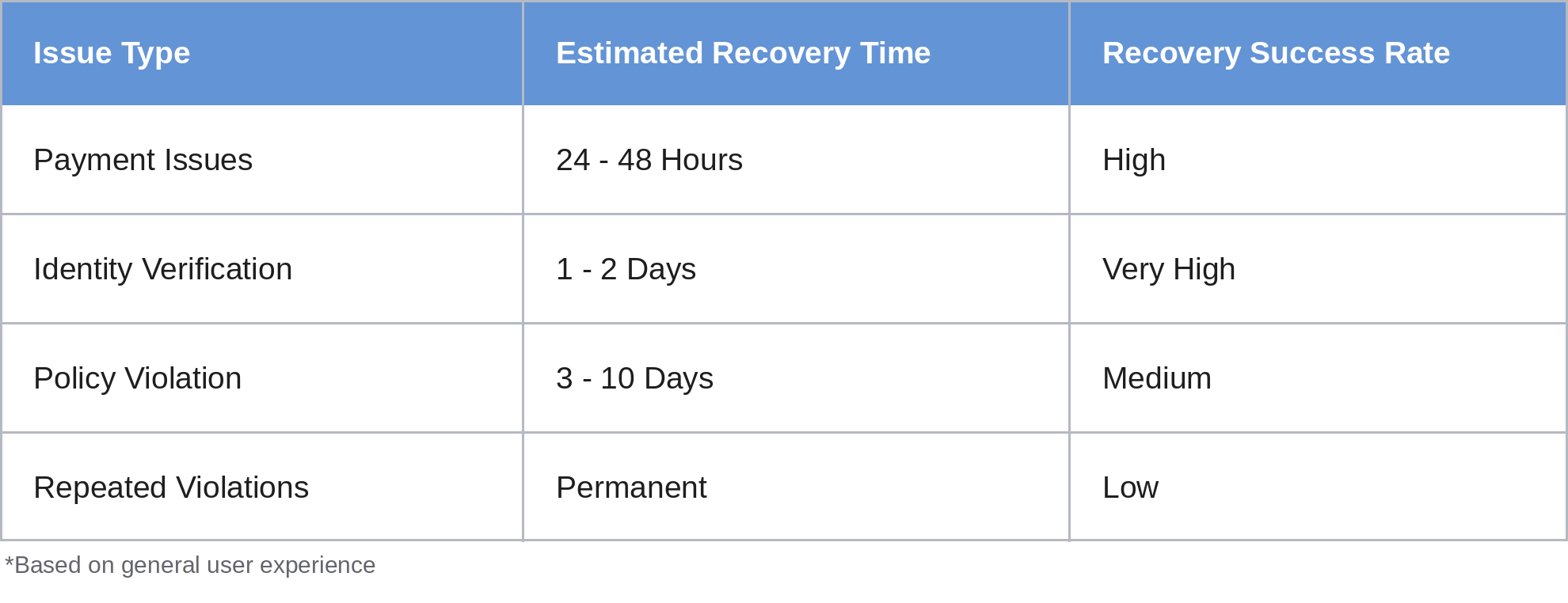
How Long Does Recovery Take
The recovery period in 2026 depends on the cause of the restriction.
- Identity Verification: 24 to 48 hours.
- Standard Appeal: 48 hours to 1 week.
- Complex Policy Reviews: 2 to 3 weeks.
Step-by-Step Guide to Fix a Disabled Ad Account
Do not panic if you see the 'Meta ad account restricted' message. Take the following steps in order:
Step 1: Validate the Situation
Your Account Quality page in the Meta Business Suite is the only reliable source for the reason your Facebook ads account is restricted.
Step 2. Resolve Payment Issues First
If your Facebook advertising account has a blocked payment method, update your payment information immediately. The account will be automatically restored if the pending bill is paid via a new card.
Step 3: Review Violating Ads
Go through your active and rejected ads and remove or edit any that may have violated Meta's advertising policies. This is an important step before submitting your appeal, as leaving violating ads active can result in an immediate rejection of your request.
How to Submit a Facebook Ad Account Disabled Appeal
After you've confirmed there's a problem, you have to make an official request for Meta to consider it. This step is known as the Facebook ad account disabled request review.
The Request Process:
- Go to the Account Quality tab within your Meta Business Suite and visit the full status page.
- Identify the limited account from the available list and select the "Request Review" button to start your appeal.
- If prompted, complete Two-Factor Authentication.
- If Meta requires identity verification, submit a copy of your National ID or passport. Ensure the name matches exactly with your Facebook account.
- Write a brief but professional explanation of what happened, what you did to solve it, and your commitment to adhering to the policies.
Pro Tip: Avoid conflict when writing your appeal message. Admit your mistake and assure that you have deleted the ads causing problems, and read through all the advertising policies.
Writing the Appeal
Use this outline when writing your appeal:
- The Problem: Describe the Facebook ad account that was disabled, including any required details like the ad account ID number.
- The Solution: State that you have already addressed the ads violating the policy rules, and have either removed them or modified them.
- The Promise: Declare that you will observe the Advertising Standards by Meta in your future ad campaigns.
What to Do if Your Appeal is Rejected
- Contact Meta Ad Support: If you have a “Business” account type, you may be able to apply for “Live Chat” or email. You can use this tool to ask them to manually review your account. Give them your account number, explain your problem clearly, and tell them what you have found as a solution. Make sure your language is professional when communicating with them.
- Use a Different Ad Account: In case you currently have an existing Business Manager account, you can create another account for advertising purposes. However, proceed with caution - creating a new account while under restriction can result in your entire Business Manager being banned by Meta.
- Review the Business Manager: In some cases, the problem might not lie within the ad account but within the Business Manager account itself. In this case, it is imperative that the Business Manager's status be checked and an appeal be filed if there is a limitation. Furthermore, business verification must be conducted whenever required.
Best Practices to Avoid Future Problems
The following actions should be taken to avoid future problems:
- Use different payment methods: Never let an inaccessible payment method in your Facebook ad account prevent you from running ads. It is important to always have an additional card available in your ad account.
- Compliance First: Follow all advertising rules and review the material before launching any social media ad campaign. Use basic software tools to scan your website and ad materials for any restricted phrases or misleading claims. This will keep your advertising account secure.
- Warm Up Ad Accounts: When starting an ad account on an advertising platform for the first time, never allocate a high budget initially to protect yourself. Allocate a smaller budget and keep increasing it. This way, you will prove yourself as a responsible advertiser on the platform.
- Clean your History: If any ad is not approved, delete it from your account right away rather than keeping it, as this can harm your account's quality and lead to future issues.
Conclusion
Deactivating the Facebook Ads account is definitely something no one wants to experience. Yet in 2026, recovering a disabled account is very much possible if you follow the right steps. As long as you remain calm and submit a request to reconsider the case of your Facebook ads account being disabled, your chances of recovery are strong. The key to solving this problem is to follow all policies.
Need Professional Help?
At Adnova, we help companies scale Meta ads with ease. From dealing with a disabled Meta ad account to coming up with a solid plan for scaling safely, Adnova can do it all for you. If you have been asked to investigate a Meta ad account that has been disabled or wish to know how you can stay ahead of your competitors through your ads, Adnova will offer complete guidance on both fronts.
Faqs
- Why is my Facebook ad account disabled suddenly?
There are several reasons your Facebook ad account may get disabled. However, some of the most common reasons for this problem are policy breaches, unsuccessful payment processing, or even suspicious activity on your account. In fact, even the smallest of errors might trigger your Facebook account disabling.
- How can I fix a disabled ad account quickly?
To reactivate a disabled ads account, start by analyzing your account’s quality status. After resolving all issues such as violation of policies and payment-related problems, you can now request to review the Facebook ad account which was disabled, giving full and honest details regarding the case.
- How many times can I appeal?
You have the option to make multiple appeals for the disabled Facebook ad accounts if your first appeal has been denied. Nevertheless, you need to ensure that you have addressed all the problems before sending another appeal.