

Meta Ads Not Delivering? Here's How to Fix It (2026 Guide)
.png)


.png)
Facebook ads are one of the most effective ways to scale your business online. But occasionally, you might run into a common problem - meta ads not delivering. Your ad is active, but no one is seeing it.
That can be frustrating, however, because no delivery means no clicks, leads, and sales. Knowing the reason why your ads are not running will help you resolve the problem quickly.
There could be multiple reasons causing this issue. This could be a low budget, wrong audience targeting, or high competition in your niche. Another reason could be that your ad is also under review or not properly approved. Even a small error in settings can prevent delivery. You can troubleshoot here, one by one, and fix your ads so they work again.
In this post, we will cover what ad not delivering is, what Facebook ad delivery status means, and how to fix it step by step.
What Does "Meta Ad Not Delivering" Mean?
When you look at your ad manager, and it says "Meta ads not delivering," it means the Meta auction system isn't showing your ads to users. It's not always a sign of a "broken" system. Still, it is often a trigger or a protective measure that, rather than malfunctioning, indicates that your campaign settings are clashing.
Many people think "Not Delivering" always means that your Facebook ad was rejected. In the real world, your Facebook ad delivery may actually be stuck for several reasons, from a spending cap to an audience that is too narrow for the system to find. In other words, the "Not Delivering" status is Meta's way of saying that, under the current parameters, there's no valid route to show your content in an auction.
Common Reasons for Meta Ads Not Delivering
Awaiting Ad Review
To ensure that every Facebook ad meets Community Standards and Advertising Policies, the ad must go through Meta's automated (and sometimes manual) review process. Usually, this occurs within 24 hours, but during high-volume periods in 2026, the process can slow. If this pending review is the reason your Facebook ads not delivering, you need to wait. Do not edit the ad set during this time. Otherwise, any change will reset the review clock.
Audience Size and Targeting Issues
A small audience is one of the most common reasons meta ads don't deliver. If you are targeting so specifically that only a few hundred people qualify, the Meta auction may not find enough users to serve the ad to.
Overlapping audiences can create problems as well. When multiple ad sets target the same people in an ad account, those ad sets compete with each other in the auction, leading to. Ensure your audience is large enough for Meta AI to optimize.
Budget and Bid Strategies
If your bid is lower, your Facebook ads risk losing to a competitor in the auction. The auction is extremely competitive in 2026. Similar to "Cost Cap" or "Bid Cap", if you set these limits too aggressively, your Facebook ads will not deliver.
Also, verify that your ad account spending limit is set correctly. Many advertisers lose track of the fact that they set an account-wide limit months earlier. As soon as that limit is reached, the ad delivery stops immediately for all campaigns.
Ad Scheduling Conflicts
Check your ad set schedule. If you scheduled a date range or used dayparting (running ads only during certain parts of the day), the meta ads not delivering status will appear as "Not Delivering" outside those active time frames. Make sure your time zone settings in the ad manager reflect local time so we don't lose you to confusion.
Ad Fatigue and Creative Issues
Meta prioritizes user experience. But if your ad delivery was off like a rocket before succumbing to a flatline, you're likely experiencing ad fatigue. This could be because the ad frequency has become too high and your target audience has seen your Facebook ad a little too often, which inevitably leads to lower engagement. High "hide ad" rates or low CTRs signal to Meta that your creative has become less relevant. As a result, our system can stop delivering it, ultimately destroying the user experience.
How to Contact Meta Ads Support
If you have already double-checked everything, such as budget, targeting, and account health, but your Facebook ads are not delivering, then you may need support from Meta.
Follow these steps:
- Visit the Meta Business Help Center.
- Select the "Support" or "Contact Support" tab.
- Choose your ad account from the list.
- Select the issue regarding Facebook ads delivery status.
- Chat with a Meta support executive.
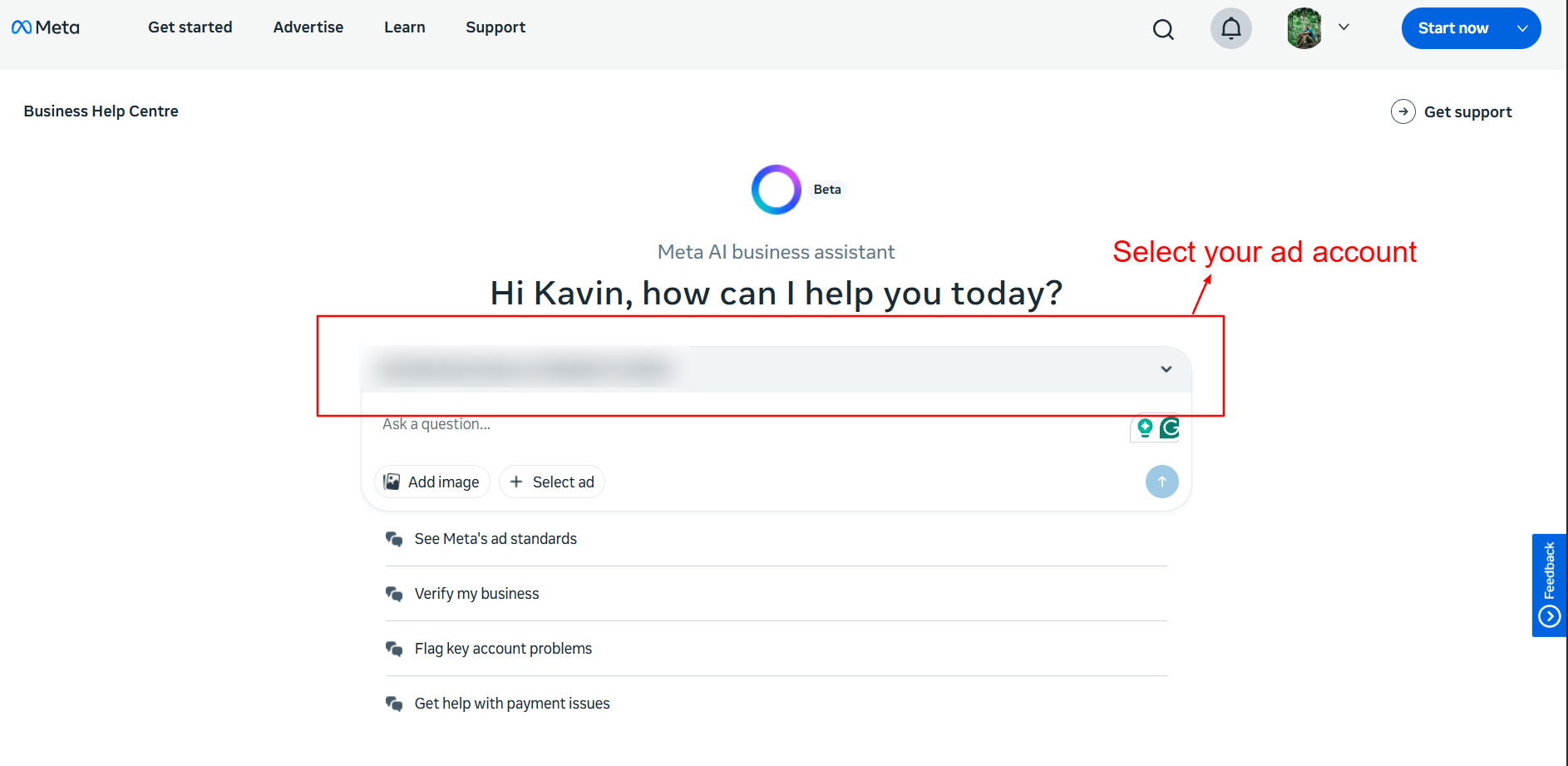
Meta's new support system, powered by AI chat features, will be faster and smarter in 2026. But you can provide them with proper details. Screenshot your ad manager dashboard at all times. This helps you communicate your issue clearly, particularly if the reason your meta ads aren't delivering is a technical rather than policy-based issue.
Moreover, it would be better to explain your problem in simple words. Reference when the problem began, what modifications you carried out, and what results you are expecting. It can help the support team resolve your issue sooner.
Optimization Checklist for 2026
Use this simple but powerful checklist to make sure your Facebook ads deliver in the future:
- Account Health: Check your “Account Quality” tab regularly. Warnings or rejected ads can still affect your delivery and preventa meta ads from delivering.
- Payment method: Check that your payment method has not lapsed. The most common reason for ad delivery stopping is an expired card or payment failure.
- Pixel/API Status: Is your Meta Pixel and Conversions API working? Without enough data, Meta cannot optimize your ads.
- Bid Strategy: If you are strict on your bid cap, switching to“Highest Volume” can help deliver better results and lower the risk of Facebook ads not performing.
- Frequent Ads Visibility Audit: When you target an audience group too frequently with the same Ad, there is a chance your target audience will stop responding to it. Refresh your creatives regularly.
- Landing Page Quality: Your website needs to load quickly and match the message of your ad. Pages that are too slow or ambiguous could hurt conversion.
- Daily Optimization: Make it a habit to check your ads daily to address issues that affect their performance before they affect your delivery.
This, in turn, means that hoping your meta ads do not deliver will become a thing of the past, as you can best utilize them as early as 2026.
Conclusion
Resolving a meta ad not delivering status demands examination on both technical and creative fronts. Closely monitoring your ad manager and familiarizing yourself with the fine-tuning settings in an ad set helps keep ads running smoothly. Monitor your spending limit and audience overlap daily to keep your ad account running smoothly.
Seeing complex Facebook ads that aren't delivering can be super confusing. That is where Adnova steps in. Adnova is the best digital growth partner to overcome ad delivery glitches and improve or maximize Facebook ad performance for higher ROI. Our experts will get deep into your Ad Manager to essentially remove constraints and grow your ad campaigns. That way, you can focus on the business aspect.
Frequently Asked Questions
- Why does my Facebook ad's delivery status say "Active", but I have 0 impressions?
This is often caused by either the bid being too low or having reached your ad account spend limit. If the status is active, however, the system will not spend money in an auction if it cannot win the auction or if it has reached its account-level total budget cap.
- How long does Meta take to review a new Facebook ad in 2026?
Most advertisements are reviewed within 24 hours. If your ad is stuck in the "Pending" state after 48 hours, then it indicates a potential meta ads not delivering issue. If you've so far only used one ad, try duplicating it in the hopes that a second attempt purges the system.
- Can a low "Ad Quality Score" cause my meta ads not to deliver?
Yes. If your ad receives high negative feedback (users click "Hide Ad"), Meta will lower your ad's ranking in the auction. If the score falls too low, delivery of ads to that one person may stop altogether, out of fear of harming the platform experience.
- What is the difference between a daily budget and an ad account spending limit?
A daily budget is the amount you are willing to spend per day on an ad set. An ad account spend limit is a "hard cap" set for the entire account. Once the limit is hit, every single Facebook ad that is not delivering errors will fire across all the campaigns.
- Will changing my targeting fix the Facebook ads not delivering status?
If your status shows "Not Delivering" due to "Audience Too Small," you can fix it immediately by expanding your targeting. Use broader interests/broader audiences, or lookalike audiences, which give the ad manager more wiggle room to find potential buyers.